This is not an official website, this website is for informational purposes only.
How to Use Tim Hortons Gift Card?
Looking for an easy and convenient way to pay for your favorite coffee and snacks? A Tim Hortons gift card is the perfect solution.
This handy card lets you enjoy everything from freshly brewed coffee to delicious breakfast sandwiches without carrying cash.
Whether you received it as a gift or bought it for yourself, learning how to use a Tim Hortons gift card both in-store, online, and via the Tim Hortons mobile app helps you make the most of its value.
In this guide, we’ll walk you through how to activate, redeem, reload, and check your Tim Hortons gift card balance effortlessly, so you can enjoy your Tims favorites anytime with ease.
Using your Tim Hortons gift card on the app or in-store is simple and secure, making it the ideal choice for convenient payments wherever you are.
What Is a Tim Hortons Gift Card?
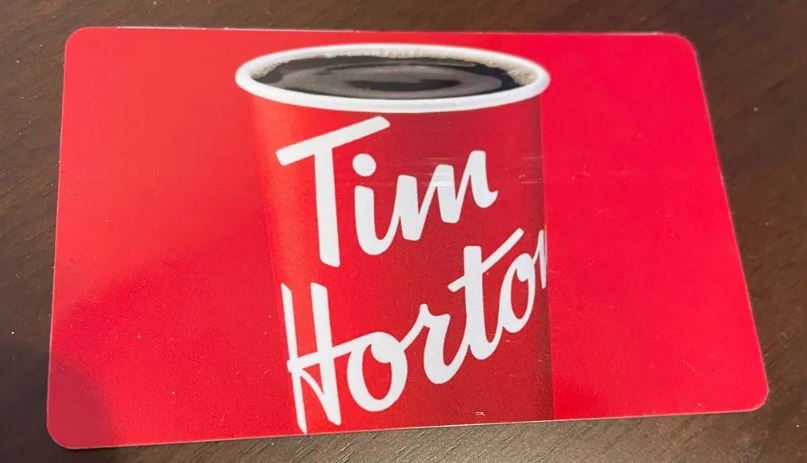
A Tim Hortons gift card is a prepaid card that you can use at any Tim Hortons store across Canada and the U.S. It’s like having a special card that stores money just for your coffee, snacks, and meals at Tim Hortons. There are two types of cards:
Physical Gift Card: This is a plastic card you get from the store or by mail. You can swipe or scan it when you pay.
Digital eGift Card: This is an electronic card sent by email. You show it on your phone when you pay.
You can buy these cards at any Tim Hortons or online on Tim Hortons’ official website.
How to Activate and Register Your Tim Hortons Gift Card
Before using your card, you might need to activate or register it for better security and features.
Activation:
Physical cards bought in-store are usually activated at purchase.
eGift cards are activated when you receive the email.
Register Your Card on the App:
Download the Tim Hortons app from your phone’s app store.
Open the app and create an account or log in.
Go to the wallet section and select “Add Gift Card.”
Enter your gift card number (16 digits) and PIN (on the back under scratch-off or in email).
Once registered, you can check your balance anytime and reload money easily.
Using Your Tim Hortons Gift Card In-Store
It’s easy and quick to use your gift card in a real store.
Order your coffee, snacks, or meal at the counter or drive-thru.
When it’s time to pay, hand your physical gift card to the cashier or open your digital gift card on your phone.
The cashier can swipe the card or scan the QR code on your phone.
If your purchase costs more than your gift card balance, just pay the extra using cash, debit, or credit card.
Your card balance updates automatically after each purchase.
Using the Gift Card with the Tim Hortons Mobile App
The Tim Hortons app lets you carry your gift card digitally and order easily.
Open the app and add your gift card to the wallet (see registration steps).
Choose your menu items and place an order on the app.
At checkout, select your gift card as the payment method.
When you arrive at the store or drive-thru, use the QR code generated by the app to pay. The cashier just scans it.
The payment amount is deducted from your card balance instantly.
Using the app is great because it lets you skip the line, track rewards, and manage your card balance conveniently.
Using Tim Hortons Gift Card for Online Orders
You can also use your gift card to pay when ordering on the Tim Hortons website if online ordering is available in your area.
Add items to your cart on the Tim Hortons website.
At checkout, enter your gift card number and PIN as the payment method.
The purchase amount will be taken from your gift card balance.
Complete your order for pickup or delivery.
Reloading Your Tim Hortons Gift Card
When your gift card balance gets low, you can add (reload) more money to keep using it.
In-store reload: Take your card to any Tim Hortons and ask the cashier to add more funds. You can pay with cash, debit, or credit.
Online reload: Log in to the Tim Hortons app or website, enter your card details, choose the amount you want to reload, and pay electronically.
Reload amounts typically range between $5 and $100. Reloading keeps the same card active and ready to use.
Checking Your Tim Hortons Gift Card Balance
It’s important to know how much money you have left on your gift card. Here’s how:
On the app: Your balance updates automatically whenever you open the wallet.
Online: Visit the Tim Hortons gift card webpage and enter your card number and PIN to see your balance.
In-store: Ask the cashier to check your balance for you.
By phone: Call Tim Hortons customer service and follow prompts to check your card balance.
Special Tips and Benefits of Using Tim Hortons Gift Card
No expiry date means you can use your card anytime it doesn’t expire!
Perfect gift for friends and family who love Tim Hortons.
Use it to budget your spending on coffee and snacks.
Registered cards can be protected if lost or stolen.
Combine with Tim Hortons rewards program on the app for extra perks.
FAQs – How to Use Tim Hortons Gift Card?
How do I use my Tim Hortons gift card in-store?
To use your Tim Hortons gift card in-store, simply present your physical card or digital card on your phone at the counter or drive-thru. The cashier will swipe or scan the card, and the purchase amount will be deducted from your gift card balance. If your purchase exceeds the balance, you can pay the difference with another payment method.
Can I use my Tim Hortons gift card on the mobile app?
Yes, you can add your Tim Hortons gift card to the Tim Hortons mobile app by entering the card number and PIN into the wallet section. Use the app to place orders and pay by scanning the QR code generated at checkout. This method is quick and convenient for skipping lines.
How do I check the balance on my Tim Hortons gift card?
You can check your Tim Hortons gift card balance in several ways: on the Tim Hortons mobile app wallet, online via their official website by entering your card number and PIN, by calling customer service, or at any Tim Hortons store.
Can I use the Tim Hortons gift card for online orders?
Yes, you can use your Tim Hortons gift card to pay for online orders on their website or app by entering your gift card details at checkout. Your card balance pays for both pickup and delivery orders when that option is available.
How do I reload my Tim Hortons gift card?
You can reload your gift card in-store by paying the cashier the desired amount or online via the Tim Hortons website or app by adding funds to your registered card. Reloading helps you maintain a balance for future purchases.
Does the Tim Hortons gift card expire?
No, Tim Hortons gift cards generally do not have an expiration date, so you can use your balance whenever you like without worrying about losing funds due to expiry.
What should I do if my Tim Hortons gift card is lost or stolen?
If you registered your Tim Hortons gift card, immediately call their customer service at 1-866-TIMCARD (846-2273) to report the loss or theft. Registered cards can be blocked and replaced with the balance transferred to a new card.
Can I use a Canadian Tim Hortons gift card in the US?
Yes, You can use your Canadian Tim Hortons gift card at participating U.S. Tim Hortons locations and vice versa.
Are there any fees for using or reloading the Tim Hortons gift card?
No, there are no fees or hidden charges for using or reloading your Tim Hortons gift card. The full value you load onto the card is available for purchases.
Can I transfer my Tim Hortons gift card balance to another person?
No, Tim Hortons gift card balances cannot be transferred or shared between cards. The balance on the card stays with the original card unless lost or stolen and reported if registered.
Conclusion
Tim Hortons gift cards make buying your favorite coffee, donuts, and snacks super easy, whether in-store, through the app, or online.
They’re a great gift idea and a convenient way to pay without cash. By activating, registering, reloading, and using the card wisely, you get the best experience.
Start enjoying Tim Hortons the smart way with your gift card today!